All posts by andre

Precise Cutting Of Material

This article  shows how to achieve good results for cutting boards with inexpensive tools.

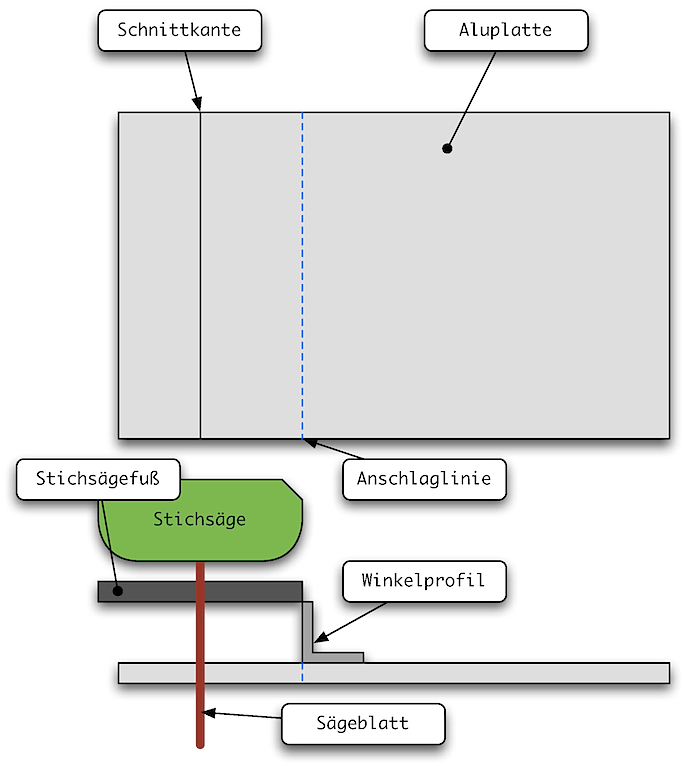
Inspired by the article about building enclosures here come the steps how to cut wood or aluminum boards with a jigsaw. With this method the cut will be very strait, so you only need to smooth it with a file for finishing.

  • Mark the edge for the cut,
  • Measure the distance between jigsaw blade and the edge of the base plate of the jigsaw
  • fixate a stopper (strait piece of wood or aluminum profile) with screw clamps exactly at this distance from the edge of the cut
  • let the jigsaw be guided by the stopper

Here a scetch of this:

pastedGraphic.png

Hierarchical Designs With GEDA

For the hobbyist there are not many powerful and free schematic and layout software. For Linux and Mac OS X there is the software package gEDA. With that you can draw schematics and create layouts. This article shows how you can create even hierachical designs with that software.

Hierarchical schematics help to split the complexity of a schematic into seperate modules. So you can draw your schematic as a block schematic and later on you can create the seperate circuits.

For example you draw your power supply as a block that only provides the voltages for the other modules. The acutal circuit for the power supply will be created later on a seperate schematics.

The following short list outlines how to create a hierarchical design with gschem, the schematics editor of gEDA. A detailed manual is attached after the list.

  • install gEDA on your computer
  • start gschem
  • delete the drawing fram from the schematics
  • draw the symbol for each module with the necessary pins and save it
  • create the gafrc file
  • create the first sheet for your schematics
  • insert all symbols for your modules on the sheet
  • connect the symbols to the schematics of each module
  • create the schematics for eacht module

gschem hierarchical tutorial

Information On Lead Free Soldering

Here is some interesting information on the topic lead free soldering. This information originates from a specialist on soldering of a big international distributor.

  • Unlike with leaded solder you need to be very careful how to solder and what materials you use. Lead free oldering is much more challanging and error-prone.
  • For lead free soldering you should use a soldering station with at least 80 W. Addionally the soldering temparature should be adjustable.
  • Lead free solder has a higher melting point as leaded solder. During the soldering there are continuous temperature drop, e.g. caused by contact with the cold solder or the cold printed circuit board (PCB). Thats why you should use a soldering tip as short as possible and as wide as possible. That ensures that the temparature drops are quite small.
  • If the soldering tip is to hot the flux contained in the solder will burn up. Thats why you should set the temparature of the soldering station about 140 Kelvin higher than the melting poind of the solder.
  • If the solder contains less than 1% of flux you should add flux.
  • The soldering tip is best cleand with a dry cleaner and not with a wet sponge. After cleaning the tip you should apply solder to it immidiately.
  • If you want to use a sponge you should use only demineralized water and wring it, so that the sponge is only moist not wet. The wetness of the sponge causes temparature drop on the top that lead to tiny cracks that eventually will destroy the tip.
  • A special cleaner should only be used if the tip is very worn and no good soldering results are possible. After using the special cleaner immediatally apply solder to the tip to prevent corroding of the tip.

MOS-FET for inverse-polarity protection

Diodes are often used to realize inverse-polarity protection. For circuits with high input currents the forward voltage of the diode can lead to a very high power dissipation of the inverse-polarity protection.

Diodes have a forward voltage that is not to be disregarded. Silicon diodes have a forward voltage of typically 0.6..0.7 Volts. At high currents this voltage can raise up to more than 1 Volt. Schottky diodes are better than silicon diodes but for high currents there are not many choices and also not very cheap ones.

The high forward voltage of diodes leads to a considerable heat dissipation.
Lets take a 1N5400 for example. This diode has a forward current of 3 Amperes.
The diode can handle this current up to 75°C (167 °F) ambient temperature. The forward voltage at 3 Amperes is 1.2 Volts. The power dissipation on the diode is therefore 3.6 Watts. The thermal resistance Rθja of the diode is 20K/W. That means the temperature of the diode raises by 72°C. The maximum allowed junction temperature of the diode is 150°C (302 °F).

An alternative for diodes are MOSFET-transistors. MOSFET have a low on-state resistance (RDS-on). For inverse-polarity protection P-MOSFET are a perfect choice because they can be inserted into the positive power supply line.
To be able to handle the same forward current as the above mentioned diode we choose a P-MOSFET RSS060P05. This has a forward current of 6 Amperes and can block up to 45 V. Its on-state resistance is maximum 53 mΩ. At 3 A the dissipated power equals (3A)2 × 0,053 Ω = 0,477 W. The voltage drop equals only 3A × 0,053 Ω = 0,159 V. The temperature raise of the MOSFET (Rθja = 62,5 K/W) is then 29.8 °C.
That means the curcuit will dissipate more than 3 W less power when using a MOSFET and not a diode. Additionally the MOSFET (three times more thermal resistance than the diode) will warm up only about 30 °C where the diode will warm up more than 70 °C.

inverse-polarity protection with P-MOSFET

The circuit above is much more complicated than a simple diode. But MOSFET can handle much more current. A MOSFET that can handle more than 10 Amperes is very easy to get. The Gate-Source junction of the MOSFET is very sensitive to high voltages. Thats why there is a protection with a Z-diode for the Gate.
Additionally you can see that the MOSFET is used “inverse”. That is important for the desired use of the MOSFET as a inverse-polarity protection. The figure shows the parasitic body diode that is connected in forward direction.
That means even if the MOSFET is not “open” and the voltage source has the right polarity there can flow a current to the protected circuit. By this “trick” there can flow a current even at low voltages. But keep in mind that the body diode can withstand only small currents.
The MOSFET needs a Gate-Source voltage of about 3 Volt to turn on. Tat means the gate voltage must be 3 Volts lower than the source voltage. That means that this curcuit is only usable for circuits tha run at more than 3 V.
When the voltage between Source and Gate is high enough the MOSFET turns on and the body diode is released. To protect the body diode at low voltages against high currents one can connect a external diode parallel to the body diode.

In the case of inverse polarity of the voltage source the body diode is connected reverse and will block the flow of current. Additionally the MOSFET will not turn on becuase its Gate is more positive than its Source.

A MOSFET is of course more expensive than a diode. A 1N5400 is available for 0,05 EUR. The MOSFET RSS060P05 costs almost 1,00 EUR, it is about 20 times more expensive. The difference depends on the choosen transistor but you can see the direction.

Despite this disadvantages of the costs and more complicated circuit there may be cases where the MOSFET preferable to the diode.
In applications running on batteries the lower dissipation power can lead to a cheaper battery or longer operation times.
In applications that operate in high temperature environments it can be that the ciruit using a diode will not be possible to realize.

Generate Modulated PWM with LTSpice

LTSpice knows different signal sources. Unfurtunately there is no modulated PWM. This article shows how to generate a voltage controlled PWM.

zwei-spannungsquellen

At first we need two normal voltage sources “voltage”. One voltage source generates the modulation voltage, the other generates the clock for the PWM.

For this example we want to generate a PWM with 20 kHz clock that is modulated by a sine wave of 2000 Hz.

As modulation source every other voltage form is usable too.

sinus-spannungsquelle-2kHz

The voltage source that generates the sine wave will be set acordingly to the requirements. The PWM shall be 5 V peak voltage and single ended (ground based). That’s why the sine gets an offset voltage of 2.5 V and an amplitude of 2.5 V. That causes the PWM to a middle value of 50%. The maximum modulation of the PWM depends only on the amplitude of the sine wave. At 2.5 V amplitude the modulation will be 100%.

dreieck-spannungsquelle-20kHz

The second voltage source generates the clock of the PWM. To achieve an actual PWM this voltage source must generate a triangular voltage. For 20 kHz the period duration is 50 µs, one ramp has a duration of 25 µs. The amplitude of this source is also set to 5 V.

Up to now this is not a PWM yet. Now both voltages need to be connected.

zwei-spannungsquellen-mit-werten

For this a common ground needs to be defined and each voltage needs a unique name. The voltage sources are connected to ground with their “-” terminal. The “+” terminal is connected to a short wire. These wires are open on the other end. Each wire is given a unique name. In our example they are named “sine” and “ramp”.

Now only the combination of both voltages to a PWM is missing.

For that combination we use the “arbitrary behavioural voltage source”. These voltage sources generate a voltage that is defined by formulas and functions.

For our use a simple IF-function will suffice: if the value of the sine wave is higher than the triangular voltage a voltage will be put out. If the value is lower 0 will be put out. For our example we choose 5 V for the peak value of the PWM.

This voltage source must be connectet to ground too. That the PWM does not stand for itself the output is connected to a simple RC low pass filter.

The last figure shows all voltages as the result.

  • Red: the sine wave,
  • Blue: the triangular voltage,
  • Green: the PWM and
  • Yellow: the voltage from the PWM after the low pass filter

komplette-simulation

simulationskurven